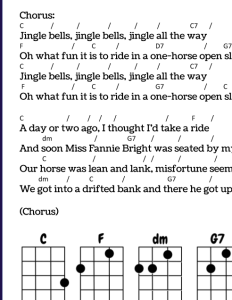
By far my most popular lesson on YouTube! This beginner-level tutorial demonstrates the C, F, and G7 chords, as well as including a sing-along at the end. My corresponding printable song sheet provides an easy reference with chord diagrams, lyrics and beat placement.
As you invest your valuable time making music with me in my videos, consider enriching your learning experience with my supplemental song sheets.
This is a resource I am sharing for free, but I ask a small price for many of my custom song sheet PDFs. The PDFs contain all of the information I show in my videos, in an easy-to-digest visual format. They are formatted to print and place in your music binder, or display on your tablet. In addition to showing which chords to play and song lyrics, these sheets also show chord diagrams to support players who are still learning.
Downloadable PDFs include full song lyrics and chord diagrams for your specified tuning.
It takes a lot of time for me to create these resources, and I hope that your support can help me to keep creating more helpful tools for learning music!
Today’s assignment was to create a piece of music using a MIDI file, and I probably did everything the most difficult way it could possibly be done. Maybe I was excited. Maybe I thought things would snap together and shape itself into something beautiful, like a shiny magnetic sculpture.
Turns out it was quite messy, like an old Magna-Doodle.
I’m going to walk you through the process (at least the steps I remember), so you might perhaps not make the same mistakes I did. My goal was to try and create MIDI files to then import into something cohesive in Soundtrap.
I was so, so excited to try Groove Pizza. This is a super cool web app, where you can manipulate drum beats. I loved the “Bembe” pattern.
This pattern is divided into 12 subdivisions, so I thought perhaps a 12/8 feel?
All the drum sounds used were empty, conga-like sounds. I liked the idea of something soft since all of the drum kits I’ve explored in Soundtrap so far feel splashy to me.
Above is the Bembe pattern from the app. I figured that could serve as a fine foundation. Next, I thought, I’ll create a different pattern for a “B” section.
Here I had one sound subdivide in 3, one in 4, and one in 6.
And, since I was making beats, I thought I’d create a 2-measure fill to punctuate different sections.
Left is measure 1, and right is measure 2 with more notes that would lead to the next section.
I downloaded all 3 patterns as MIDI files. Next I went into the Song Maker app in Chrome Music Lab to create a melody. I thought I’d make something simple, so I stuck with something fairly pentatonic and slow.
I started with the lower line, downloaded that on its own, then added a higher harmony part.
I downloaded that as a MIDI. Yay, this is easy! Now just to import into Soundtrap…
Wait, my work laptop doesn’t support MIDI files??? Okay, how about my desktop.
Hmm….Something doesn’t look quite right…
I was fairly certain, when I downloaded the MIDI files, that they were either the same length or maybe one was twice as long. Like, even. Those don’t look even.
It took me a long time to figure out how to make the beatmaker conducive to triplet-feel patterns. I still don’t think I really did it. I figured out how to get it into 3/4, but the drum pattern really didn’t end up the way it sounded in Groove Pizza. I’m not sure putting it in 3/4 really did anything except adjust the length of the other loops I added.
Nevertheless, I just had to finish something. So in honor of Groove Pizza and my apparent affinity for the marimba sound, I give you Mozzarimba.
Maybe things not fitting together sounds good sometimes?